You have 0 items in your cart

 info@wsystem.com +33 2 40 78 22 44
- For USA only (800) 875-5907
Are you planning a museum, an immersive room or a projection mapping installation? You know Modulo Pi and want to compare solutions before choosing your media server. Perhaps you are looking for a more affordable media server that is easy to learn.
Proxima combines hardware and software in a media server that lets you play your content, adjust your projections and program your playback sequences. You benefit from an intuitive interface, a system designed for reliable daily operation and free training to help you get started.
If your priorities are to prepare your projections easily and hand over everyday controls to the venue’s team, Proxima is an alternative to Modulo Pi worth exploring.
You want to spend your time on the quality of your projections and the visitor experience. To do that, you need software that is easy to learn, reliable equipment and a team available to help.
Proxima addresses these priorities with built-in video mapping tools and three models for installations requiring two, four or six video outputs.
Your priority | What Proxima offers |
Get to grips with your media server easily | An intuitive interface for organising your media, preparing sequences and adjusting projections |
Keep your budget affordable | Three models to suit your needs, a lifetime licence, free training and free support |
Fit your images to the setting | Warping up to 15 × 15 per output, cropping and masks |
Blend multiple projections | Horizontal and vertical soft-edge blending, with frame-accurate synchronisation |
Play your content in sequence | Unlimited playlists and sequences, transitions and seamless loops |
Hand over everyday controls to the team | Sequence triggering through an external interface, such as a tablet via OSC |
Receive video from another application | NDI input; optional HDMI capture on the 4040 and 4060 |
Get help during setup and use | One day of training and direct access to Waves System technical support |
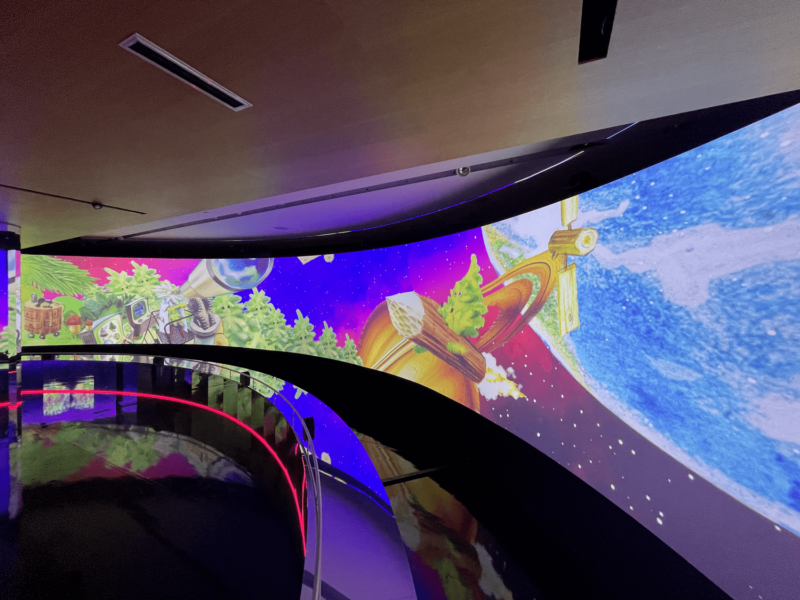
For Loxam, Outvision designed an immersive booth with a 270° projection, using four ultra-short-throw projectors.
Romain Farmer, head of Outvision, highlights the solution’s competitive cost, intuitive interface and four video outputs. He also praises its ease of integration, reliability and responsive support, particularly with colour adjustments. If you want to hand over everyday controls to a venue’s team, Proxima makes the process easier: the integrator prepares the installation, and users have the actions they need on their tablet.
Projecting onto a curved wall, an object or several surfaces? Warping tools let you adjust the image geometry. You can also crop your media and use masks to define the projection areas.
Where images overlap, soft-edge blending lets you adjust the joins. Proxima includes a warping grid of up to 15 × 15 per output and frame-accurate synchronisation.
Organise your media in Proxima Composer to prepare the different stages of your visitor journey or show. Manage transitions and loops, then choose how to trigger your sequences.
Access Composer over the local network to prepare your project and adjust settings.
Already using a controller, or planning to install a control tablet? The OSC API lets you trigger preprogrammed sequences, among other functions. Proxima also supports control via Art-Net.
You can therefore provide an interface suited to your team: select a sequence, start content playback or stop playback.
Working with software that produces interactive or generative visuals? You can send its video feed to Proxima via NDI. On the 4040 and 4060 models, you can also add an HDMI capture card.
Keep your content creation tool and use Proxima to incorporate its feed into your projections.
Preparing media, connecting equipment and adjusting projections are part of your daily work. But have you also considered the people who will use the installation after you leave?
Work with them to define the controls they need each day, then plan an introduction to the system and a simple procedure for starting and stopping it. With Proxima, you can prepare sequences and trigger them from an external control system.
You need the visuals on the venue’s surfaces to match what you imagined. With Proxima Composer’s intuitive interface, you can organise your media, adjust their position and prepare sequences without a learning curve.
To assess the solution, bring some representative content to a demonstration. You can see how it is set up and explore the tools you will use to adjust your projections.
You need to start a projection at opening time, select content or pause a sequence. Define these needs at the start of the project so your integrator can prepare the corresponding controls for daily operation.
They can provide an interface tailored to your needs, while keeping mapping settings accessible to the people responsible for configuration.
For a museum or immersive room, you need equipment suited to regular use. Proxima media servers are designed to operate 24/7, withstand power outages and come with a three-year warranty.
You also stay in control of updates: you decide when to install them. The licence is supplied for life.
Although Proxima has an intuitive interface, training helps you get to grips with the media server faster and make full use of its capabilities. We offer one day of free training to help you learn the server, prepare your sequences and play your content.
There are no prerequisites for this training. It gives you the opportunity to ask questions and become familiar with how the product works.
Need help with a setting or a technical question afterwards? You can contact our team directly.
Model | Specified video outputs | Form factor | Optional HDMI capture |
2 × WUXGA | Compact | No | |
4 × 4K | Rackmount | Yes | |
6 × 4K | Rackmount | Yes |
For two WUXGA projections, consider the 4020. Its compact form factor allows it to be installed close to the projectors, including on the ceiling.
If you need more outputs or 4K projections, consider the 4040 or 4060. Need more than six outputs? Synchronise multiple Proxima 4040 units using the supplied network protocol.
To confirm the right model, specify the codec, resolution, frame rate and number of media files to be played simultaneously. The number of connectors alone does not determine how your project will perform.
If you need to mix live sources or have several operators working simultaneously, Modulo Player offers a built-in live mixer and multi-user operation. Its X-Map tools and autocalibration module may also influence your choice if you need to adjust complex projections or recalibrate them regularly.
Do you also want to simulate your venue in 3D, create real-time scenes or incorporate tracking within a single environment? Take a look at Modulo Kinetic, Modulo Pi’s other solution, and compare it with the tools your creative work requires.
For your playback and mapping project, Proxima remains an alternative to assess with your own content, surfaces and intended controls.
To prepare for a demonstration or request a quotation, gather the following information:
If you have specific redundancy or response-time requirements, include those too. They will help determine the equipment and services your installation needs.
For Skedanoz in Carnac, CS Prod used a Proxima 4040 and a Proxima 4060 to project images and animations onto the megalithic alignments.
In his feedback, Christian Salès highlights how easy it was to program and adjust the projections, as well as the reliability of the hardware and software during performances.
Want to know whether Proxima costs less than Modulo Player? Request two quotations based on the same specification.
Compare the server and its options, as well as control equipment, project preparation, training and maintenance. Outvision’s feedback highlights competitive pricing for its project. To understand the difference for yours, compare equivalent configurations.
Do you know how many projectors you will use, what content you need to play and which controls your team will need? Tell us about your project.
During a demonstration with a Waves System technician, you will discover Proxima Composer and we will review which model suits your installation.